owner draw菜单的设置
本文介绍如何设置owner draw菜单(右键菜单)的显示。
也请参阅文件结构中的「owner draw菜单」。
可以在shell的descript.txt中设置,也可以在为获取资源而发出的若干SHIORI Event的响应中设置。
在shell的descript.txt中设置
在shell的descript.txt中,可以设置用作普通状态背景、选中状态背景和侧边栏的3张图片,以及文字颜色。
仅SSP还可以指定文字大小和字体。
dressup菜单的项目排列等也在shell的descript.txt中设置,详情请参阅「dressup的设置」页面。
请注意,如果同一项目同时通过SHIORI Event设置,则SHIORI Event的设置优先。
在SSP中,也可以在ghost的descript.txt(ghost/master/descript.txt)中填写相同项目。如果shell的descript.txt中也有相同项目,则shell侧的设置优先。
以下是使用descript.txt的记述示例。
menu.background.bitmap.filename,background.png
menu.foreground.bitmap.filename,foreground.png
menu.sidebar.bitmap.filename,sidebar.png

menu.background.alignment,lefttop
menu.foreground.alignment,lefttop
menu.sidebar.alignment,bottom

menu.background.font.color.r,0
menu.background.font.color.g,0
menu.background.font.color.b,0
menu.foreground.font.color.r,0
menu.foreground.font.color.g,0
menu.foreground.font.color.b,255
menu.separator.color.r,0
menu.separator.color.g,0
menu.separator.color.b,0
menu.disable.font.color.r,120
menu.disable.font.color.g,120
menu.disable.font.color.b,120
各行的详情参见「Shell设置」,下面作简要说明。
menu.background.bitmap.filename,background.png
menu.foreground.bitmap.filename,foreground.png
menu.sidebar.bitmap.filename,sidebar.png
以上三行分别设置owner draw菜单使用的3种图片。
background是普通状态下的菜单背景。
foreground是选中项目的背景图片。这一点稍难理解:仅在owner draw菜单中光标当前所在的部分,background图片会被foreground图片对应位置的部分替换。
sidebar是附在owner draw菜单左侧的图片。
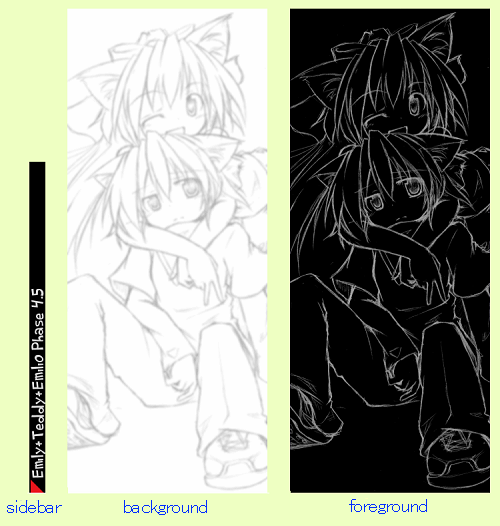
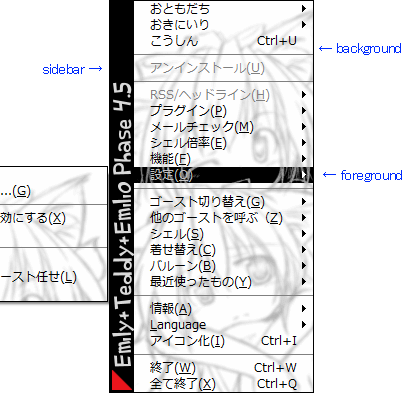
上方是使用的3张图片,下方是实际显示效果(例:Emily/Phase4.5)
menu.background.alignment,lefttop
menu.foreground.alignment,lefttop
menu.sidebar.alignment,bottom
以上三行分别设置3种图片的排列位置。
在上述例子中,background和foreground图片以左上角为起点排列。如果由于菜单的文字数量或项目数量使菜单大于背景图片,超出区域的右侧和下侧分别以图片右端和左端的颜色延伸显示。
menu.background.font.color.r,0
menu.background.font.color.g,0
menu.background.font.color.b,0
menu.foreground.font.color.r,0
menu.foreground.font.color.g,0
menu.foreground.font.color.b,255
menu.separator.color.r,0
menu.separator.color.g,0
menu.separator.color.b,0
menu.disable.font.color.r,120
menu.disable.font.color.g,120
menu.disable.font.color.b,120
以上是文字颜色的设置。
background是普通状态下的菜单文字颜色,foreground是光标位于项目上时的文字颜色,separator是菜单分隔符的颜色,disable是非活动项目的文字颜色,例如没有dressup的shell中的dressup菜单,或不支持network update的ghost中的network update项目。
RGB颜色的各颜色分量使用0~255的数值指定。rgb全部为255时是白色,全部为0时是黑色。
通过SHIORI Event设置
除了与shell侧descript.txt相同的设置外,还可以设置各菜单项目的显示名称,以及收藏夹和门户链接集的内容。
即使同一项目在shell侧descript.txt中已有设置,SHIORI Event的设置仍然优先。
对于用于获取菜单资源的SHIORI Event,如何设置和返回值,需要参阅各SHIORI的说明。
例如,使用Satori时,可以参考以下页面。
有关其他SHIORI Event,请参阅「SHIORI Resource」页面。